A free Windows security baseline for the devices your AI tools run on
Shadow AI turns up on your devices first.
Engramic Baseline finds the AI tools on a device, flags risky ones such as an agent running as administrator, and checks and helps harden the device itself: permissions, vulnerabilities, configuration and malware protection, so a compromised agent has a smaller blast radius. Free and open source.
Supports Windows 11 and Windows Server 2016 to 2025.
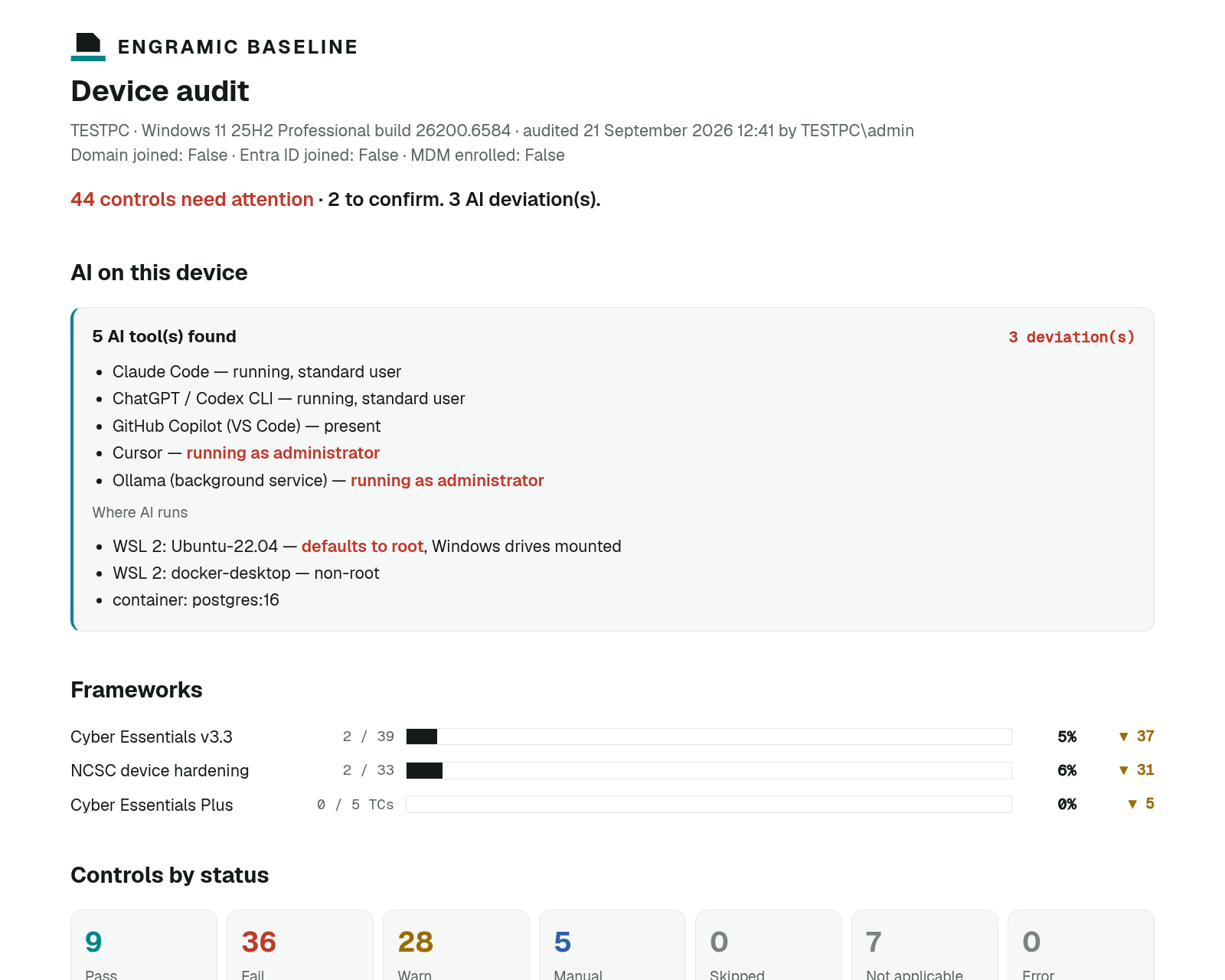
Other tools that find AI agents on a device only tell you what they found, and most need an enterprise licence to see the results. Baseline runs on one machine, writes a report you can hand to someone, and offers a reversible fix for most of what it flags.
What it checks
57 checks to reduce the security risks an AI agent inherits.
Whether it's a coding assistant or an autonomous agent, it inherits the device's permissions and weaknesses. Baseline groups its checks around what that means: which AI tools are present, permissions, vulnerabilities, configuration, malware protection and boot integrity.
AI tools on the device
Finds AI tools such as Claude, Copilot and Cursor and the MCP servers they use, flags any running as administrator or holding credentials in plain text, and checks WSL environments that default to root.
Permissions
Who has admin rights, how people sign in, and MFA on cloud services.
Vulnerabilities
Missing Windows, app and firmware updates, unsupported Windows versions, and BIOS updates for Dell, HP and Lenovo.
Configuration
Secure default settings and accounts, the firewall on every network profile, and NCSC's Windows hardening guidance.
Malware protection
Antivirus present, running and up to date, on Windows Server and third-party products.
Boot integrity
Whether the device is ready for Microsoft's 2023 Secure Boot certificates.
Stay in control
No setting changes until you choose it.
When a check fails, the tool offers a fix. You decide which ones run.
Every fix is previewed
See what a fix will change before it's applied.
High-risk fixes are never pre-selected
Fixes that could interrupt someone's work stay unticked — you choose them.
Undo log and rollback
Each change is logged, so you can roll it back.
Nothing leaves the device
The audit runs and reports locally. Only the make and model leave, for an optional firmware lookup you can turn off. With Intune, results go to your own tenant.
Coming soon
Go deeper: four questions about every AI agent on the device.
Baseline already finds the AI tools on each device, the MCP servers they're wired to and credentials left in plain text. The AI Agent Pack takes the next step — working out what those connections actually reach, and what it would mean if one were compromised:
- What can it reach?
- What can it do?
- What credentials and permissions does it have?
- What happens if it's compromised?
Deployment
Scale from one device to the whole fleet.
Desktop app
Run it on one machine, then read the report and choose which fixes to apply.
PowerShell
Run it from PowerShell or a remote session, and keep the report.
Intune
Deploys as a Microsoft Intune compliance script automation.
Pricing
Pay for what you need.
Free
Available now
Open source
- Finds the AI tools on each device and the MCP servers they're wired to
- Flags agent credentials stored in plain text
- The whole open-source tool
- Firmware lookup included
AI Agent Pack
Coming soon
£3 per device per month, ex VAT
5 to 80 devices. From £180 a year.
- Resolves what each agent's credentials actually reach
- Flags agents that combine company data, outside content and a way to send data out
- Shows which actions they can take without approval
Fleet Pack
Coming soon
Pricing at launch
- Hosted dashboard
- History
- Drift alerts
The AI Agent Pack is billed annually, from 5 devices. Over 80 devices, or for the Fleet Pack, and we'll size it with you.
Questions about Engramic Baseline
What is shadow AI?
Tools and connections added to work devices without the business's knowledge. Often well meant, but nobody can say what they reach. Read more
Does Engramic Baseline find AI tools or MCP servers?
Yes, both, in the free tool. It finds recognised AI tools such as Claude, Copilot, Cursor and ChatGPT, the MCP servers each one is wired to, whether they run as administrator, and the WSL or container environments they use. It also flags credentials left in plain text in those configurations. What the free tool doesn't do is work out what those credentials reach — that's the AI Agent Pack.
How does Baseline reduce an AI agent's blast radius?
By locking down permissions, closing missing updates, fixing risky configuration, flagging any AI tool running as administrator, and keeping malware protection active, all before an agent runs.
Does Baseline send data anywhere?
Only the make and model leave the device, for an optional firmware lookup you can turn off. With Intune, compliance results go to your own Intune tenant.
Can I deploy it across a fleet with Intune?
Yes. It deploys as a Microsoft Intune compliance script automation.
Does it help with Cyber Essentials?
It checks against the Cyber Essentials requirements and NCSC device guidance, and includes a Cyber Essentials Plus device-test estimate. It doesn't certify you; certification comes from an IASME-licensed body.
Start with one device.
Download it, run the audit and read the report. No setting on the device changes until you choose a fix.
Download on GitHubBaseline shows what your agents can do. Engramic decides what they're given.
Get Started with Engramic